Unlocking the LS Master K120s PLC Password free download Step by Step Guide
The LS Master K120s PLC is a widely used programmable logic controller (PLC) that offers excellent control and automation capabilities. However, there may be instances where users encounter a situation where they have forgotten the password to access the PLC. In this article, we will explore the LS Master K120s PLC password unlock process and provide practical tips to help users overcome this challenge.
Understanding the LS Master k120s PLC Unlock Password Protection
Password protection is an essential security feature provided by the LS Master k120s PLC Unlock Password to prevent unauthorized access and protect sensitive data. However, it can be frustrating if you forget the password and need to access the PLC urgently. Fortunately, there are methods available to unlock the password without the need for expensive software or technical expertise.
Practical Tips to Unlock the LS Master K120s PLC Password
Default Passwords: The first step in attempting to unlock the LS Master K120s PLC password is to try the default passwords provided by the manufacturer. These default passwords are often used as a fallback option when users forget their custom passwords. Refer to the user manual or documentation to find the default password and give it a try.
Backdoor Passwords: In some cases, PLC manufacturers may create backdoor passwords to assist users in accessing their devices. These passwords are typically not publicly disclosed but can be obtained through technical support channels.
In general, password-cracking tools such as “all PLC and HMI password unlock v4.2” are available online and claim to unlock LG/LS PLC passwords. However, these tools often rely on reported vulnerabilities or so-called backdoor methods in an attempt to bypass password protection mechanisms. Therefore, such tools should be approached with extreme caution and used only in legal and fully authorized situations.
One popular tool for unlocking LG/LS PLC passwords is "PLCUNLOCKBD Backup Tools." This software allows you to retrieve the program from the PLC, including the password, without the need for physical access.
Contact Technical Support: If the above methods fail, the best course of action is to contact plcunlockbd technical support. plcunlockbd provides dedicated customer support to address password-related issues and offer guidance in unlocking the LS PLC. They may request proof of ownership or other relevant information to verify your request before assisting with the password recovery process.
Conclusion - LS Master k120s PLC Unlock Password
LS Master k120s PLC Unlock Password can challenging task, but with the right approach and tools, it is possible to regain access to your PLC. In this article, we have explored practical tips such as trying default passwords, seeking backdoor passwords, utilizing password cracking tools (with caution), and reaching out to LS Industrial Systems' technical support.
It is essential to keep in mind that password protection is implemented for security reasons. Always maintain a secure record of passwords and follow best practices to prevent unauthorized access.
How to LS Master k120s PLC Unlock Password?
1) First go to plcunlockbd.com and Download PLC HMI password unlock v4.2 (Link in the Description)
2) When Your Download is complete you get this File, Open Unlock Software
3) Select Your PLC Model
Go to Select PLC Type > LG > K120S Series
Like the picture below
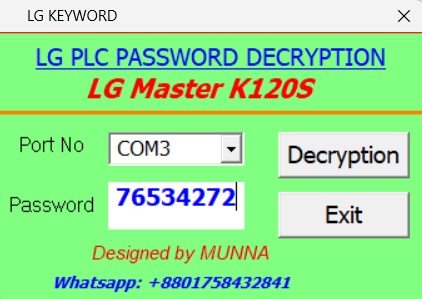
Select your correct COM port in my case My port: (COM3)
Click Decryption Then you will see your password in the password Section. in my case my PLC password is (76534272)
ALL PLC & HMI UNLOCK VIDEOS
https://drive.google.com/drive/folders/1ttiBOlf84f6Foqq9SOPu1-5B45TIHnlw?usp=drive_link
If you still have trouble understanding something, send me an sms on
WhatsApp (+8801758432841) and i will help you .
Thanks!
ALL PLC UNLOCK BD SOFTWARE V4.2
Contact With us to Unlock Your PLC and HMI FREE
Cell: +8801758432841
Whatsapp: +8801758432841
Telegram: +8801758432841
Wechat: +8801758432841
You can directly email us if you need any information
Email: plcunlockbd@gmail.com
Click on Download Button and contact us on WhatsApp. Our teem response your message as soon as possible