Taking Control: A User's Guide to the Fuji Hakko HMI UG Series software free download Tool
Understanding technology can sometimes feel like trying to drink from a fire hose; it's overwhelming. One example is when you need to access protected software or hardware and can't remember the password. This can be genuinely frustrating, especially when the said software is as important as Fuji Hakko's HMI UG Series password unlock software free download. But don't worry, there are password unlock tools available to help you out of this bind, and the best part - they're free to download! In this article, we will break down how to effectively use the Fuji Hakko HMI UG series password unlock software free download.
Unlocking Your Device Safely and Smartly
Utilizing password unlock software can sound somewhat daunting. It can feel like stepping into a world filled with unfamiliar terminologies and processes. "No need to fret; it's less intimidating than it may seem."
What Is Fuji Hakko HMI UG Series password unlock software free download?
First of all, Fuji Hakko’s HMI UG Series password unlock software free download is a series of beautiful, high-quality user interface panels developed for industrial applications. Moreover, as with any advanced software system, these panels are password-protected in order to ensure secure operations and prevent unauthorized access.
The Need for a Password Unlock Tool
With the variety of passwords, we need to remember these days, forgetting one or two is more common than you might think. However, this is where the password unlock tool comes in handy. In fact, the software is designed to bypass these passwords safely, thereby granting you access to your device without causing any harm or data loss.
Locating and Fuji Hakko HMI UG series password unlock software free download Tool
Now that you understand why you might need the password unlock tool let's dive into how to download it.
Scroll Down this post section.
See the Download Button.
Then Click on the Download Button and Download this Software.
Remember, you do not have to purchase this software - it is available free of charge.
Using the Password Unlock Tool
With the software downloaded and installed, let's walk you through how to use it.
Start the tool.
Enter the model number of your HMI device.
Follow the prompts or steps provided by the software.
A Word of Caution
Despite the evident benefits of a password unlock tool, it is essential to acknowledge potential risks. Whether you're a seasoned tech expert or a novice, you should always:
Ensure the source of the software is genuine to avoid downloading harmful malware or viruses.
Use the software responsibly. Invading privacy or breaching security protocols is both unethical and, in many cases, illegal.
Always have a backup of your data before using any password unlock software.
Wrapping It Up
Being stuck out of your device due to a forgotten password is no longer a problem with the Fuji Hakko HMI UG series password unlock tool. By following the steps in this guide, you should have all the information you need to safely download and use this tool. As always, just ensure you are using this software responsibly and you're all set.
In essence, be smart, be careful, and think before you act. Now, therefore, go forth, download your tool, and confidently regain control of your Fuji Hakko HMI UG Series password unlock software free download device! Moreover, always remember that, as the saying goes, “With great power comes great responsibility.”
Indeed, “Technology, much like art, represents a soaring manifestation of the human imagination,” — Daniel Bell.
If, at any time, you need additional help, please don’t hesitate to reach out to Fuji Hakko’s Customer Support. Furthermore, trust us - they’re just as useful and reliable as the unlock tool itself!
How to unlock Fuji Hakko HMI UG series password
1) First go to plcunlockbd.com and Download Fuji Hakko HMI UG series password unlock software free download ( Link in the Description )

2) When Your Download is complete you get this File, Open Unlock Software

3) Select Your HMI Model
Go to Select HMI Type > FUJI-HAKKO > UG SERIES
Like the picture below

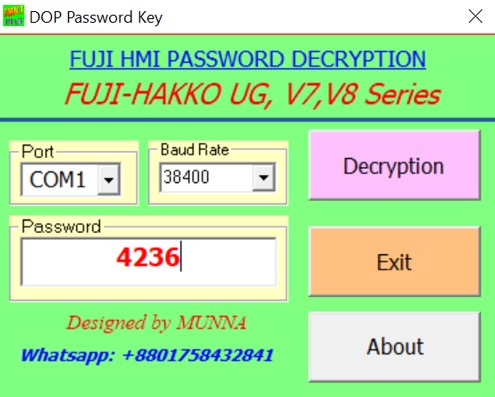
4) When you click UG SERIES now you can see new window
Select your Right communication Port and Baud Rate
My COM Port COM1 and Baud Rate 38400

If you still have trouble understanding something, send me an sms on
WhatsApp (+8801758432841) and i will help you .
Thanks!
ALL PLC & HMI UNLOCK VIDEOS
https://drive.google.com/drive/folders/1ttiBOlf84f6Foqq9SOPu1-5B45TIHnlw?usp=drive_link
ALL PLC UNLOCK BD SOFTWARE V4.2
Contact With us to Unlock Your PLC and HMI FREE
Cell: +8801758432841
______________________________________
Whatsapp: +8801758432841
Telegram: +8801758432841
Wechat: +8801758432841
______________________________________
You can directly email us if you need any information
Email: plcunlockbd@gmail.com
Click on Download Button and contact us on what'sapp. Our teem response your message as soon as possible
Fuji Hakko HMI UG series password unlock software free download
https://drive.google.com/drive/folders/1ttiBOlf84f6Foqq9SOPu1-5B45TIHnlw?usp=drive_link