Introduction - How to Unlock Weintek HMI XOB File
Weintek Human-Machine Interface (HMI) devices are widely and increasingly used in industrial automation because they allow operators to effectively control and monitor various processes. Moreover, these devices often store their project files in XOB format, which is a proprietary file type, thereby ensuring secure and structured data management. Sometimes, you may need to unlock or recover a password-protected XOB file, either due to a forgotten password or other legitimate reasons. In this guide, we will explore the steps to unlock a Weintek HMI XOB file.
Understanding the XOB File Format
Before delving into the unlocking process, it's essential to understand the XOB file format. XOB files contain the configuration, graphics, and logic of your HMI project. They often password-protected to prevent unauthorized access or tampering.
Steps to Unlock Weintek HMI XOB File
Locate the XOB File: Begin by locating the XOB file you want to unlock. It should be on your HMI device or a backup stored on your computer.
Contact Weintek Support: The best and most secure way to unlock a password-protected XOB file is to contact Weintek's customer support. They will guide you through the process, ensuring that it done correctly and within legal bounds. Prepared to provide proof of ownership and explain the reason for unlocking the file.
Use Recovery Software: If you do not have access to Weintek support or have a legitimate reason to unlock the file independently, you can explore third-party recovery software tools. These tools may help you recover or reset the password. However, be cautious when using third-party software, as it may not always be reliable or safe.
Reset the HMI Device: As a last resort, if all else fails, you can reset your HMI device to its factory settings. Keep in mind that this action will erase all data, including your project, and should used only when no other options are available. Consult the device's manual for instructions on resetting it to factory settings.
Tips for Password Management
To avoid future complications with locked XOB files, consider the following best practices for password management:
Document Passwords Securely: Always document your passwords in a secure and organized manner. Avoid using generic or easily guessable passwords.
Regular Backups: Create regular backups of your HMI projects. This way, you can easily restore your project in case of any issues with locked files.
Password Recovery Options: Weintek HMI devices often provide options for password recovery or hints to help you remember your password. Utilize these features when setting your passwords.
Multiple Users: If multiple users are involved in HMI project development, implement user-based access control with different permission levels. This can help prevent unauthorized changes to your project.
How to Unlock Weintek HMI XOB File
1) First go to plcunlockbd.com and Download How to Unlock weintek HMI xob file ( Link in the Description )

2) When Your Download is complete you get this File, Open Unlock Software

3) Select Your HMI Model
Go to Select HMI Type > WEINTEK > CRACK XOB
Like the picture below

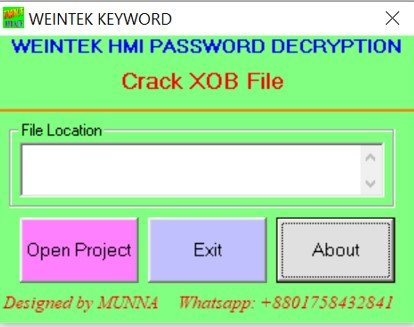
4) When you click Crack XOB now you can see new window
Select your Right File Location

If you still have trouble understanding something, send me an sms on
WhatsApp (+8801758432841) and i will help you .
Thanks!
In conclusion, unlocking a Weintek HMI XOB file should only done when you have legitimate reasons, such as ownership or authorized access. It's essential to follow the recommended steps and, if necessary, seek assistance from Weintek support. Additionally, practicing good password management and maintaining regular backups of your projects can help you avoid the need for unlocking XOB files in the future.
https://drive.google.com/drive/folders/1ttiBOlf84f6Foqq9SOPu1-5B45TIHnlw?usp=drive_link
How to Unlock XOB File Weintek HMI
Contact With us to Unlock Your PLC and HMI FREE
Cell: +8801758432841
______________________________________
Whatsapp: +8801758432841
Telegram: +8801758432841
Wechat: +8801758432841
______________________________________
You can directly email us if you need any information
Email: plcunlockbd@gmail.com
Click on Download Button and contact us on whatsapp. Our team response your message as soon as possible
How to Unlock weintek HMI XOB File
https://drive.google.com/drive/folders/1ttiBOlf84f6Foqq9SOPu1-5B45TIHnlw?