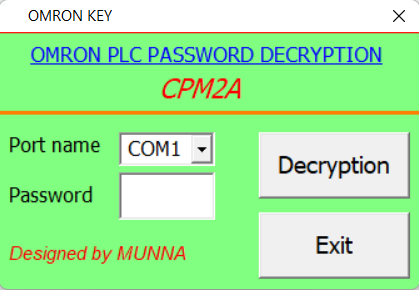
Omron CPM2A PLC Password Unlock, Exploring Unlocking Methods and Free Download Options
Omron CPM2A programmable logic controllers (PLCs) widely utilized in industrial automation systems and, in addition, provide efficient control and monitoring capabilities. Moreover, these devices help streamline operations while ensuring reliable and accurate performance. Consequently, they play an essential role in maintaining productivity across a wide range of industrial applications.
However, encountering a password-protected Omron CPM2A PLC pose can a challenge when access required for maintenance, troubleshooting, or reprogramming. In this blog post, we will delve into different methods for unlocking the password of an Omron CPM2A PLC, including options for free download tools.
Understanding Omron CPM2A PLC Password Protection:
Omron CPM2A PLCs employ password protection as an important security measure, therefore ensuring that only authorized personnel can access and modify the PLC’s program and settings. Typically, the password set by the original programmer or system administrator, thus maintaining controlled access.
In addition, this security feature helps prevent unauthorized changes, while also safeguarding the integrity of the system. However, if the password forgotten or lost, regaining access to the PLC becomes necessary. Let's explore various methods to unlock the Omron CPM2A PLC password.
Method 1: Default Password:
Some Omron CPM2A PLC models have a default password that can conveniently used to unlock the system. For instance, the default password for most models is typically "SYSMAC." Moreover, knowing the default password can help technicians gain quick access, thereby saving time during initial setup or troubleshooting.
However, it is important to change the default password afterward, in order to maintain system security. It recommended to attempt this default password first when trying to unlock the PLC. However, bear in mind that if the default password has changed by the programmer, this method may not be successful.
Method 2: Password Recovery Software:
PLC and HMI Password Unlock v4.2 password recovery software tools are available that can assist in legitimate access-recovery scenarios for Omron CPM2A PLCs. In particular, these software tools utilize advanced algorithms and diagnostic techniques to help authorized users regain access when passwords lost.
Moreover, they designed to support approved maintenance and troubleshooting processes, thereby reducing downtime while improving operational continuity. While some options in this category are available for free download, caution must exercised. It's crucial to ensure the legitimacy and authenticity of any free software, as unauthorized or untrustworthy sources may pose a security risk.
How to Unlock Omron CPM2A PLC Password?
1) First, go to plcunlockbd.com and, then, click on the Omron CPM2A PLC Unlock Password Free Download link provided in the description. After that, follow the on-screen instructions carefully in order to complete the download process easily and quickly. Finally, ensure that the file saved properly before proceeding further.

2) When Your Download is complete you get this File, Open Unlock Software

3) Select Your PLC Model
Go to Select PLC Type > OMRON > CPM2A Series
Like the picture below

Select your correct COM port in my case (COM1)
Click DECRYPTION then you will see your password in the password Section.
If you still have trouble understanding something, send me an sms on
WhatsApp (+8801758432841) and i will help you .
Thanks!
Conclusion: Omron CPM2A PLC Unlock Password Free Download
Unlocking the password of an Omron CPM2A PLC can necessary in certain scenarios, especially when access to critical systems restricted. Moreover, the methods discussed in this blog post provide potential solutions for regaining access to a password-protected PLC.
However, these solutions should always applied responsibly, and furthermore, only in authorized and legitimate situations to ensure compliance with security policies. While free download options exist for password recovery software, caution advised when obtaining such tools to ensure their safety and legitimacy.
It recommended to seek professional assistance if default passwords and free options do not yield the desired results. Remember, attempting to unlock a PLC without proper authorization is unethical and may violate security protocols. Always consult qualified personnel or the original programmer when dealing with password-protected Omron CPM2A PLCs.
Omron CPM2A PLC Unlock Password Free Download
Contact With us to Unlock Your PLC and HMI FREE
Cell: +8801758432841
_____________________________________
Whatsapp: +8801758432841
Telegram: +8801758432841
Wechat: +8801758432841
_____________________________________
You can directly email us if you need any information
Email: plcunlockbd@gmail.com
Click on Download Button and contact us on whatsapp. Our team response your message as soon as possible
OMRON CPM2A PLC Password Unlock Software FREE Download
https://drive.google.com/drive/folders/1ttiBOlf84f6Foqq9SOPu1-5B45TIHnlw?usp=drive_link