Omron CS1G PLC Password Unlock A Comprehensive Guide with Practical Tips
The Omron CS1G PLC Unlock Software is a reliable and widely used programmable logic controller (PLC) that offers advanced automation capabilities. However, encountering a forgotten or misplaced password for the CS1G PLC can be a frustrating situation. In this article, we will delve into the topic of Omron CS1G PLC password unlocking, exploring both the possibilities of free download solutions and practical tips to address this issue effectively.
Understanding Omron CS1G PLC Passwords:
The Omron CS1G PLC is equipped with a password protection feature, therefore securing intellectual property and, at the same time, preventing unauthorized access to the programmable logic controller. Moreover, this security measure ensures that only authorized personnel can modify or operate the system, thereby maintaining system integrity while protecting critical automation processes. The password set by the programmer or system administrator during the configuration process. Unfortunately, if the password lost or forgotten, accessing the PLC program becomes challenging.
Free Download Solutions for Omron CS1G PLC Password Unlock:
It's important to note that the Omron CS1G PLC password protection designed to provide robust security. As such, the availability of free download solutions for unlocking the password is quite limited. Specifically, Omron, as the manufacturer, does not provide an official free unlock tool for the CS1G PLC. Therefore, users should contact www.plcunlockbd.com Support,as only they can help you unlock your PLC password safely and for free.Furthermore, seeking authorized support ensures that the process is secure while also maintaining the integrity of your system.
Practical Tips for Omron CS1G PLC Password Unlock:
Contact plcunlockbd Support: If you find yourself locked out of your CS1G PLC due to a forgotten password, it is advisable to reach out to plcunlockbd technical support. Their experts can guide you through the recovery process and provide appropriate solutions based on your specific situation.
Documentation and Backup: Maintaining comprehensive documentation and backups of your PLC program is crucial. This includes keeping records of passwords, program files, and relevant system information. Regularly creating backups ensures that you have a restore point to fall back on in case of password-related issues.
Password Management: Implementing proper password management practices can help prevent password-related complications. It is advisable to store passwords securely, preferably using a password manager. Regularly updating and changing passwords also reduces the risk of forgetting them.
Training and Knowledge Transfer: Enabling multiple personnel within your organization to have a solid understanding of Omron PLC programming can significantly mitigate the risk of being solely reliant on one person's knowledge.
In addition, promoting knowledge sharing and, at the same time, implementing cross-training initiatives helps ensure continuity while also enhancing problem-solving capabilities. Consequently, your team becomes better equipped to handle challenges and maintain efficient operations even in the absence of key personnel.
How to Unlock OMRON CS1G PLC Password?
1) First, go to plcunlockbd.com and, then, click on the Omron CS1G PLC Unlock Password link provided in the description. Afterward, follow the instructions carefully, so that you can complete the process successfully. Additionally, ensure that you verify the download before proceeding, thereby avoiding potential errors or complications.

2) When Your Download is complete you get this File, Open Unlock Software

3) Select Your PLC Model
Go to Select PLC Type > OMRON > CS1G Series
Like the picture below

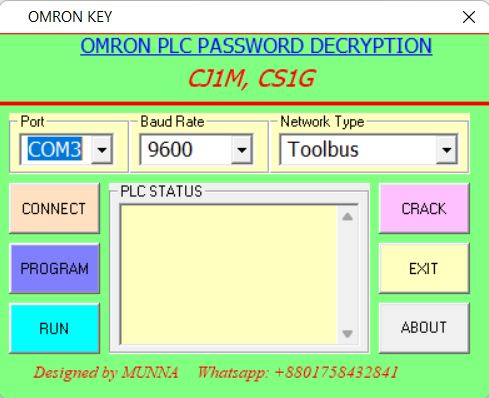
Select your correct COM port, Baud Rate and Network in my case My port: (COM3), 9600, Toolbus
Click CONNECT then Click PROGRAM then CRACK Then you will see your password in the password Section.
If you still have trouble understanding something, send me an sms on
Whatsapp (+8801758432841) and i will help you .
Thanks!
Omron CS1G PLC Unlock Password Free Download
Contact With us to Unlock Your PLC and HMI FREE
Cell: +8801758432841
_____________________________________
Whatsapp: +8801758432841
Telegram: +8801758432841
Wechat: +8801758432841
_____________________________________
You can directly email us if you need any information
Email: plcunlockbd@gmail.com
First, click on the Download button and, after that, contact us on WhatsApp. Once you send your message, our team will respond as quickly as possible. Furthermore, we are always ready to assist you, thereby ensuring prompt support while also addressing your queries efficiently and effectively.