Siemens S7-300 PLC Password Unlock Free Download Guide
Siemens S7-300 programmable logic controllers (PLCs) widely used in industrial automation due to their reliability and robustness. PLCs often contain sensitive and critical data, making password protection an essential security measure. However, situations may arise where accessing a locked PLC becomes necessary. In this article, we will provide an in-depth guide on Siemens S7 300 PLC Unlock, along with practical tips to assist users in navigating this process.
Understanding Siemens S7-300 PLC Password Protection
Siemens S7-300 PLCs employ a password protection feature that restricts unauthorized access to the device. When a password set, users required to provide the correct credentials to gain access to the PLC's programming and configuration settings. This security mechanism ensures the integrity and confidentiality of the stored data.
Legal and Ethical Considerations
Before attempting to unlock a Siemens S7-300 PLC, it is crucial to understand the legal and ethical implications. Unauthorized access to a PLC without proper authorization may be illegal and violate applicable laws and regulations. It always recommended to obtain proper permissions and consult with relevant stakeholders before undertaking any actions related to PLC password unlocking.
Practical Tips for Unlocking Siemens S7-300 PLC
First and foremost, consult the user manual, as the very first step in Siemens S7 300 PLC Unlock is to carefully review the official documentation. In particular, it provides comprehensive information on password protection, built-in security features, and possible unlocking methods specific to the model you are working with. Moreover, the manual serves as an invaluable resource for understanding the PLC’s functionality and, consequently, helps you proceed more confidently and efficiently.
Method 2: Contacting PLCUNLOCKBD Technical Support
If the above methods fail, the best course of action is to contact plcunlockbd technical support. plcunlockbd provides dedicated customer support to address password-related issues and offer guidance in Siemens S7 300 PLC Unlock. They may request proof of ownership or other relevant information to verify your request before assisting with the password recovery process.
3. Default Passwords
Siemens S7 300 PLC Unlock have default passwords that can used to regain access in certain situations. It recommended to try common default passwords such as "0000" or "1234." However, it crucial to change the default password once access regained to ensure optimal security.
Method 4: Using Omron PLC Password Unlocker Tools
all plc and hmi password unlock v4.2 are available online that claim to unlock Siemens PLC passwords. These tools often rely on vulnerabilities or backdoor methods to bypass the password protection mechanism. One popular tool for unlocking siemens PLC passwords is "PLCUNLOCKBD Backup Tools." This software allows you to retrieve the program from the PLC, including the password, without the need for physical access.
5. Hardware Reset
In extreme cases where all other methods fail, a hardware reset can attempted. This involves removing the power supply to the PLC and short-circuiting specific pins or jumpers as per the manufacturer's instructions. It is essential to exercise extreme caution when performing a hardware reset, as it can potentially damage the PLC or lead to data loss.
How to Unlock SIEMENS S7300 PLC Password?
1) First go to plcunlockbd.com and Siemens S7 300 PLC Unlock Password (Link in the Description)

2) When Your Download is complete you get this File, Open Unlock Software

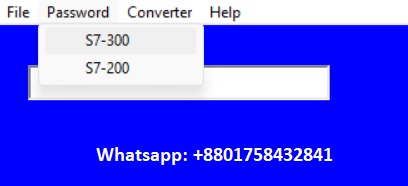
3) Select Your PLC Model
Go to Select PLC Type > SIEMENS > S7-300 Series
Like the picture below

First Learn how to copy the image file by contacting PLCunlockbd then unlock your PLC Easily

In my case My PLC password is (28121969)
If you still have trouble understanding something, send me an sms on
whatsapp ( +8801758432841 ) and i will help you .
Thanks!
Conclusion: Siemens S7 300 PLC Unlock Password
Unlocking a password-protected Siemens S7-300 PLC requires careful consideration of legal and ethical implications, along with a thorough understanding of the device's functionalities. While the process may vary depending on the specific model and circumstances, the practical tips provided in this article can serve as a general guideline.
It always recommended to consult the official user manual, contact Siemens support, and obtain proper legal permissions before attempting any unlocking methods. By following these best practices, users can safely and responsibly navigate the process of unlocking Siemens S7-300 PLCs while ensuring the security of sensitive data.
Siemens S7 300 PLC Unlock Password
Contact With us to Unlock Your PLC and HMI FREE
Cell: +8801758432841
Whatsapp: +8801758432841
Telegram: +8801758432841
Wechat: +8801758432841
You can directly email us if you need any information
Email: plcunlockbd@gmail.com
Click on Download Button and contact us on whatsapp. Our team response your message as soon as possible
SIEMENS S7-300 PLC Password Unlock Software FREE Download
https://drive.google.com/drive/folders/1ttiBOlf84f6Foqq9SOPu1-5B45TIHnlw?usp=drive_link